Connecting the Forms to the Data-Layer (part 1)
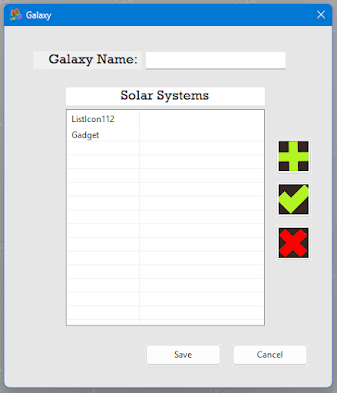
Completing this series of Entries can not be complete until we connect the data-Layer with the Forms, and the is the goal of these next few entries. As methodical as my approch was with the Data-Layer, will be my approach to Forms. Now regardless, of what tool, if any, you use to develop your forms; Forms serve only Two Purposes. The first being, to present data, from the database, to the users, and Secondly to input all changes the user makes back into the Database. I will pick up where we left off, and build out our Galaxy/SolarSystem Example with the following Forms: Galaxy Form: Solar System Form: And here is the Code that generates these forms. Procedure.i Window_frmSolarSystem() If OpenWindow(#Window_frmSolarSystem,0,0,430,186,"Solar System",#PB_Window_SystemMenu|#PB_Window_ScreenCentered|#PB_Window_Invisible,WindowID(#Window_frmMain)) TextGadget(#Gadget_frmSolarSystem_lbName,40,10,150,25,"Name: ",#PB_Text_Right) SetGadgetFont(#Gadget_...